 Retrieving Archived Orders | Archive Search Results
The results of your archive search will be displayed in the “Archive Search Results” section of the page. Use the navigation at the top of the section to view and search results. The number of pages of archived records that matched your search criteria (25 records per page) is displayed at the top of the Archive Search Results section.
- View Next Page—To view the next page of search results, click the “>” button at the right of the page number (the “>” will only appear if there is more than one page of search results).
- View Previous Page—To view the previous page of search results, click the “<” button at the left of the page number (the “<” will only appear if there is more than one page of search results).
- Jump to Page—If you want to jump directly to a page of records, select the page number in the “Jump to Page” drop-down menu at the top right of the screen.
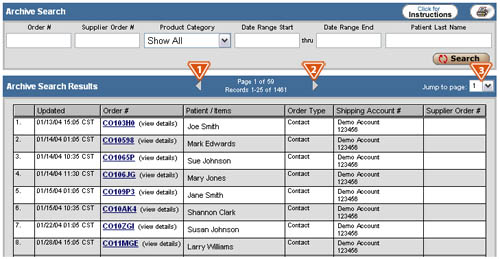
If you need help retrieving an archived order, click the “Click for Instructions” button at the top right of the “Archives” page. To print the page, click the printer icon button located to the right of the “Click for Instructions” button.